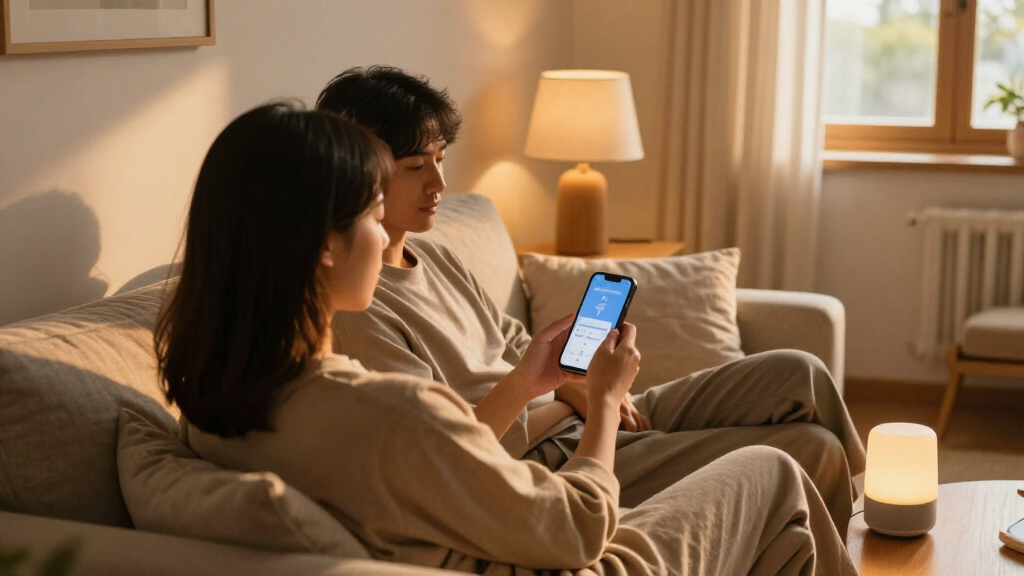

For couples choosing smart home devices, the best fit depends on whether you want simple shared controls, room-to-room communication, or a connected home hub. I name the Amazon Echo Show 5 best overall for its shared display and Alexa controls, while the Tikkitouch Long-Distance Touch Lamps offer a more personal way to signal between rooms. The TP-Link Tapo S505 Matter Smart Light Switch is a strong choice for couples who want familiar wall controls alongside smart-home integration. The tradeoffs are compatibility, installation effort, and whether a device helps both partners or mainly serves one routine. Read on for the full breakdown and guidance on matching a device to your home and habits.

Get gifts for the two of you delivered free — and shop member deals
- Fast, free delivery on millions of items
- Access to Prime Big Deal Days deals on October 6–7
- Prime Video, Amazon Music and more included
Key Takeaways
- The Echo Show 5 is the most flexible shared pick in this lineup, combining Alexa access with a screen for household information and controls.
- Tikkitouch lamps serve a distinct couple-focused purpose: they can signal between paired lamps, while smart plugs and switches mainly automate household devices.
- Matter support separates several plug and switch options, but it does not remove the need to check each device’s wiring, platform support, and setup requirements.
- Smart plugs are the easiest entry point for compatible lamps and appliances; they cannot add dimming or smart features to devices that lack them.
- The thermostat and Echo devices suit different priorities: the thermostat targets shared climate routines, while Echo Spot and Echo Dot offer Alexa access with less emphasis on a screen.
| GHome Wi-Fi Smart Plug with App and Voice Control | 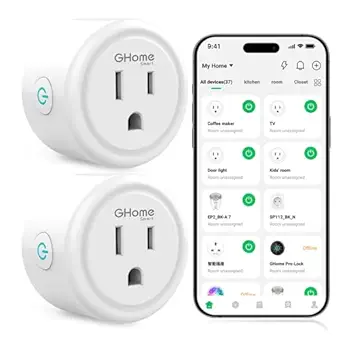 | Best Starter Pick | Operating voltage: 120 V | Maximum wattage: 1200 W | Connectivity: 2.4 GHz Wi-Fi | VIEW LATEST PRICE | See Our Full Breakdown |
| TP-Link Tapo S505 Matter Smart Light Switch, 2-Pack | 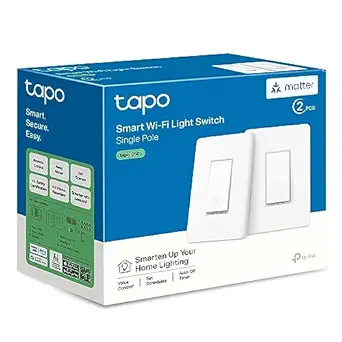 | Best for Shared Room Lighting | Model: Tapo S505 | Pack size: 2 | Compatibility: Apple Home, Amazon Alexa, Google Home, Samsung SmartThings | VIEW LATEST PRICE | See Our Full Breakdown |
| Tikkitouch Long-Distance Touch Lamps, Set of 2 |  | Best for Long-Distance Connection | Set size: 2 lamps | Connectivity: Wi-Fi and Bluetooth | Color options: 16 million combinations | VIEW LATEST PRICE | See Our Full Breakdown |
| Linkind Matter Smart Plug |  | Best for Cross-Platform Routines | Connectivity: Matter, 2.4 GHz Wi-Fi, IPv6 | Maximum power: 1800 W | Maximum current: 15 A | VIEW LATEST PRICE | See Our Full Breakdown |
| ZINDRA Matter Wi-Fi Touch Light Switch, Single-Pole, Neutral Wire Required, White |  | Best Glass-Finish Switch | Model: AN-WS02 | Switch type: Touch | Circuit type: Single-pole (1-way) | VIEW LATEST PRICE | See Our Full Breakdown |
| Tikkitouch Long-Distance Touch Lamps, Set of 2 |  | Best for Long-Distance Connection | Set size: 2 lamps | Light source: LED | Wattage: 5 watts | VIEW LATEST PRICE | See Our Full Breakdown |
| Amazon Smart Thermostat with Alexa and Ring Compatibility |  | Best for Shared Climate Routines | Compatibility: Alexa and Ring | Wiring: C-wire required | Control: Alexa app, schedules, and compatible Alexa devices | VIEW LATEST PRICE | See Our Full Breakdown |
| Amazon Echo Show 5 Smart Display with Alexa, Cloud Blue |  | Best for Video Calls and Shared Home Updates | Display: 5.5 inches | Camera: 2 MP | Voice assistant: Alexa | VIEW LATEST PRICE | See Our Full Breakdown |
| Amazon Echo Spot Smart Alarm Clock with Alexa, Glacier White |  | Best for Couples’ Bedside Routines | Dimensions: 4.5 x 4.1 x 4.4 in (113 x 103 x 111 mm) | Weight: 14.3 oz (405 g) | Display: 2.83-inch touchscreen, 240 x 320 pixels | VIEW LATEST PRICE | See Our Full Breakdown |
| Amazon Echo Dot (5th Gen) Smart Speaker, Glacier White |  | Best Compact Shared Assistant | Generation: 5th Gen | Dimensions: 3.9 × 3.9 × 3.5 in (100 × 100 × 89 mm) | Weight: 10.7 oz (304 g) | VIEW LATEST PRICE | See Our Full Breakdown |
| couples smart home device | Connectivity |
|---|---|
| GHome Wi-Fi Smart Plug with Ap | 2.4 GHz Wi-Fi |
| TP-Link Tapo S505 Matter Smart | 2.4 GHz Wi-Fi; Matter over local network |
| Tikkitouch Long-Distance Touch | Wi-Fi and Bluetooth |
| Linkind Matter Smart Plug | Matter, 2.4 GHz Wi-Fi, IPv6 |
| ZINDRA Matter Wi-Fi Touch Ligh | Matter, 2.4 GHz Wi-Fi |
| Tikkitouch Long-Distance Touch | Wi-Fi and Bluetooth |
| Amazon Smart Thermostat with A | — |
| Amazon Echo Show 5 Smart Displ | — |
| Amazon Echo Spot Smart Alarm C | — |
| Amazon Echo Dot | — |
More Details on Our Top Picks
GHome Wi-Fi Smart Plug with App and Voice Control
For couples starting to automate a shared home, the GHome Smart Plug offers a straightforward way to schedule a lamp or another compatible device without changing wiring. Either person can use the app remotely, while Alexa and Google Assistant add voice control for everyday routines. Compared with the Linkind Matter Smart Plug, GHome has a lower listed power limit and does not offer Matter-based local control during internet outages, but its setup does not call for a Matter hub. The tradeoff is a 2.4 GHz Wi-Fi requirement and an initial setup through the GHome app before connecting a voice assistant. I’d choose it for a simple shared routine, rather than as the foundation for a multi-platform smart home.
Pros:- App access allows either partner to control a connected device remotely
- Timers and schedules can automate shared household routines
- Works with Alexa and Google Assistant
- Does not require a separate hub
Cons:- Limited to 1200 W maximum
- Requires a 2.4 GHz Wi-Fi network
- Voice assistant linking requires setup through the GHome app
Best for: Couples who want to schedule a lamp or other compatible low-power device and share app or voice control without adding a hub
Not ideal for: Households automating higher-power appliances or seeking Matter local control across several smart home platforms
- Operating voltage:120 V
- Maximum wattage:1200 W
- Connectivity:2.4 GHz Wi-Fi
- Compatible assistants:Alexa, Google Assistant
- Control methods:App, remote, touch, voice
- Hub required:No
- Certifications:ETL, FCC listed
Our verdict“Choose GHome for a simple, hub-free way to automate a shared lamp or compatible device with app and voice control.”
TP-Link Tapo S505 Matter Smart Light Switch, 2-Pack
The Tapo S505 2-pack suits couples who want built-in control of two light circuits and a shared system that can work across major smart home platforms. Matter support and local network control can keep device-to-device routines available on the home network during an internet disruption. That gives it a different role from the GHome Wi-Fi Smart Plug, which adds schedules to an existing outlet but does not replace a wall switch. Installation takes more planning: each switch is single-pole and needs a neutral wire, so the existing wiring must match. The Tapo app guides setup, though this is still a wired project rather than a quick plug-in addition. I’d favor this pair for couples coordinating room lighting; renters or anyone with incompatible wiring should skip it.
Pros:- Two switches can bring smart control to separate light circuits
- Matter compatibility spans Apple Home, Alexa, Google Home, and SmartThings
- Local network control supports device-to-device operation
- App-guided installation and a two-year warranty
Cons:- Neutral wire is required at each installation point
- Single-pole design does not suit 3-way circuits
- Requires 2.4 GHz Wi-Fi
Best for: Couples who own their home, have neutral wires and single-pole circuits, and want coordinated smart control for two light locations
Not ideal for: Renters or buyers whose wall boxes lack a neutral wire or use 3-way circuits
- Model:Tapo S505
- Pack size:2
- Compatibility:Apple Home, Amazon Alexa, Google Home, Samsung SmartThings
- Connectivity:2.4 GHz Wi-Fi; Matter over local network
- Wiring:Neutral wire required
- Switch type:Single pole
- Input voltage:100–120 VAC, 50/60 Hz
- Current:15 A
- Certification and warranty:UL certified; 2 years
Our verdict“Pick the Tapo pair if your wiring fits and you want to coordinate wall-controlled lighting across two shared spaces.”
Tikkitouch Long-Distance Touch Lamps, Set of 2
Unlike a switch or plug that automates a household device, the Tikkitouch lamp pair gives couples a simple shared signal: touch one lamp and its paired lamp lights up. That makes it the most personal pick here, especially for partners in separate rooms or apart during the day. The app customization offers colors, brightness, effects, and timers, while the GHome and Linkind plugs focus on controlling devices plugged into outlets. The distinctive touch connection comes with limits: both lamps depend on Wi-Fi or Bluetooth, and the stated regional support covers the U.S. and U.S.-Canada connections. App registration is required, and the lamps should stay away from damp areas. I’d choose these for a small gesture between partners, not as a substitute for broad smart home control.
Pros:- Touching one lamp can light its paired lamp
- Offers app controls for color, brightness, effects, and timers
- Supports connections with up to nine loved ones
- App use has no subscription fees
Cons:- App registration and Wi-Fi or Bluetooth connectivity are required
- Supported regions are limited
- Not suitable for damp environments
Best for: Couples who want a lamp in each person’s space to act as a touch-activated signal when they are apart
Not ideal for: Buyers seeking wide regional availability, moisture-resistant lamps, or smart control of existing household devices
- Set size:2 lamps
- Connectivity:Wi-Fi and Bluetooth
- Color options:16 million combinations
- Controls:Touch and app
- App features:Color and effect customization, brightness adjustment, timers, weather display
- Group connections:Up to 9 loved ones
- Supported regions:U.S. and Canada-U.S. connections
- Care:Wipe with a soft cloth; avoid moisture and harsh cleaners
Our verdict“Choose the Tikkitouch pair if a touch-triggered light between partners matters more than general home automation.”
Linkind Matter Smart Plug
For couples whose shared home spans Apple, Alexa, Google, or SmartThings, the Linkind Matter Smart Plug is the most flexible plug in this group. It supports local communication over the home network, which can keep compatible routines running through an internet outage. Compared with the GHome Wi-Fi Smart Plug, it allows a higher maximum load and adds Matter, but that flexibility brings setup dependencies: several platforms require a Matter-compatible hub, and the network must support IPv6 as well as 2.4 GHz Wi-Fi. The compact design and overload protection suit everyday plugged-in devices, though buyers should check their platform’s hub needs before planning a shared routine. I’d pick Linkind when cross-platform compatibility matters more than the simplest possible setup.
Pros:- Matter compatibility covers several major smart home platforms
- Local network communication can support control during internet outages
- Supports voice control, remote access, schedules, and timers
- Compact form with short-circuit and overload protection
Cons:- Requires 2.4 GHz Wi-Fi and IPv6
- Several listed platforms require a Matter-compatible hub
- The hub requirement can add setup steps compared with GHome
Best for: Couples using different smart home platforms who want a shared plug with local network control and have a compatible Matter hub
Not ideal for: Buyers without IPv6 support or a Matter-compatible hub for their chosen platform, or those wanting the simplest plug-in setup
- Connectivity:Matter, 2.4 GHz Wi-Fi, IPv6
- Maximum power:1800 W
- Maximum current:15 A
- Compatible platforms:Apple Home, Alexa, Google Home, SmartThings, AiDot
- Safety features:FCC certified; fire-resistant materials; short-circuit and overload protection
- Control features:Voice control, remote access, schedules, and timers
Our verdict“Choose Linkind for a shared smart plug when both partners need broad platform support and can meet its network and hub requirements.”
ZINDRA Matter Wi-Fi Touch Light Switch, Single-Pole, Neutral Wire Required, White
The ZINDRA Matter Touch Switch is the style-led wall control in this lineup: its tempered glass panel gives a shared room a sleeker touch interface, while Matter connects it to Apple Home, Alexa, Google Home, and SmartThings. Compared with the TP-Link Tapo S505, it is a single switch rather than a two-pack, so it fits buyers updating one location or prioritizing the panel finish. App and voice controls, schedules, and remote access can help partners coordinate lighting, but installation fit is non-negotiable: it needs a neutral wire and works only on single-pole circuits. Cross-platform integration also calls for a Matter controller or hub. I’d choose it for one compatible switch box where appearance matters; the Tapo pair makes more sense when two locations are the priority.
Pros:- Matter compatibility spans Apple Home, Alexa, Google Home, and SmartThings
- Touch, app, and voice control support shared lighting routines
- Tempered glass panel offers a polished wall appearance
- Slim housing fits standard U.S. wall boxes
Cons:- Requires a neutral wire
- Does not work with 3-way circuits
- A Matter controller or hub is required for cross-platform integration
Best for: Couples updating one compatible single-pole switch location who want Matter control and a tempered glass touch panel
Not ideal for: Renters, homes without neutral wires, 3-way circuits, or buyers seeking a two-switch bundle
- Model:AN-WS02
- Switch type:Touch
- Circuit type:Single-pole (1-way)
- Neutral wire:Required
- Connectivity:Matter, 2.4 GHz Wi-Fi
- Compatible platforms:Apple Home, Amazon Alexa, Google Home, Samsung SmartThings
- Operating voltage:110 V
- Panel and housing:Tempered glass; thermoplastic
- Dimensions and certification:4.72 x 2.83 x 1.25 inches; FCC
Our verdict“Choose ZINDRA for a single compatible wall box when a glass touch panel and Matter integration are the priorities.”
Tikkitouch Long-Distance Touch Lamps, Set of 2
For couples who live apart, these lamps turn a touch at home into a small, shared signal: touching one can light the connected lamp remotely. The two-lamp set is more personal than an Echo device, which controls compatible home devices through Alexa but does not offer this dedicated lamp-to-lamp gesture. App controls add color, brightness, effects, and timers, so each person can make the lamp fit a bedroom or work nook. The tradeoff is reliance on app registration and a network connection; the supported regions are currently limited to the U.S. and Canada. With connections for up to nine people, it can also serve family or friends, though that may dilute its appeal as a private couples ritual.
Pros:- Touching one lamp can light a connected partner’s lamp remotely
- App provides color, brightness, effect, and timer controls
- Supports connections with up to nine people
- Matte tabletop design suits bedrooms and work areas
Cons:- Requires app registration and Wi-Fi or Bluetooth connectivity
- Supported regions are currently limited to the U.S. and Canada
- Not water resistant
Best for: Long-distance couples in the U.S. or Canada who want a simple visual way to send each other a signal
Not ideal for: Couples outside the supported regions or anyone who wants lighting that works without app registration and network connectivity
- Set size:2 lamps
- Light source:LED
- Wattage:5 watts
- Controls:App and touch
- Connectivity:Wi-Fi and Bluetooth
- Color options:16 million combinations
- Maximum connected users:9
- Mounting type:Tabletop
Our verdict“Choose this set if you and your partner want a personal, touch-activated light signal and both live in a supported region.”
Amazon Smart Thermostat with Alexa and Ring Compatibility
For couples sharing a home, a thermostat can smooth out the daily tug-of-war over heating and cooling. This model supports schedules and remote Alexa app control, so partners can set a routine together or adjust the home while away. It is a more practical shared-home pick than the Tikkitouch lamps, which create a personal long-distance signal but do not manage household comfort. The thermostat’s ENERGY STAR certification and automatic control options may help reduce energy use, though presence- or temperature-based adjustments depend on compatible Alexa devices. DIY installation has app guidance, but the required C-wire can rule it out in homes without suitable wiring. That wiring check matters more here than Alexa familiarity: without a C-wire, installation is not a fit.
Pros:- Schedules can keep shared heating and cooling routines consistent
- Alexa app allows remote temperature monitoring and control
- ENERGY STAR certified
- App guidance supports DIY installation
Cons:- Requires a C-wire
- Automatic temperature or presence adjustments require compatible Alexa devices
Best for: Couples with compatible home wiring who want shared heating and cooling schedules and remote control
Not ideal for: Renters or homeowners without a C-wire, or households without compatible Alexa devices for automatic adjustments
- Compatibility:Alexa and Ring
- Wiring:C-wire required
- Control:Alexa app, schedules, and compatible Alexa devices
- Installation:DIY with Alexa app guidance
- Technology:Honeywell Home thermostat technology
- Energy certification:ENERGY STAR
Our verdict“Pick this thermostat if both partners want convenient shared climate control and the home has a C-wire.”
Amazon Echo Show 5 Smart Display with Alexa, Cloud Blue
The Echo Show 5 gives couples a shared spot for video calls, quick updates, and compatible smart home controls. Its 5.5-inch display and built-in camera make it better suited to checking in face to face than the camera-free Echo Spot, while its screen can also show compatible camera feeds. For a bedside routine, the Spot’s smaller alarm-clock format may take up less attention; this model earns its place when visual interaction matters. Alexa can bring news, weather, entertainment, and device controls together, but those controls work only with compatible smart home products. Video calls are also limited to people using the Alexa app or a screen-equipped Echo. A camera shutter and mic/camera off button give privacy-conscious couples direct controls.
Pros:- 5.5-inch display supports video calls and at-a-glance updates
- Built-in camera can view compatible camera feeds
- Controls compatible smart home devices through Alexa
- Camera shutter and microphone/camera off button add privacy controls
Cons:- Video calling is limited to Alexa app users and screen-equipped Echo devices
- Smart home controls require compatible devices
Best for: Couples who want a compact shared screen for video calls, camera viewing, and Alexa smart home controls
Not ideal for: People who want a camera-free bedside device or need video calling with contacts outside the Alexa ecosystem
- Display:5.5 inches
- Camera:2 MP
- Voice assistant:Alexa
- Color:Cloud Blue
- Recycled materials:Fabric yarn and aluminum made from 100% recycled materials
- Packaging:100% recyclable
Our verdict“Choose the Echo Show 5 if a shared video-call screen and visual smart home controls matter more than a camera-free design.”
Amazon Echo Spot Smart Alarm Clock with Alexa, Glacier White
As a shared bedside assistant, the Echo Spot keeps the focus on alarms, reminders, weather, and audio rather than video calls. Its 2.83-inch touchscreen gives couples useful glanceable information in a smaller format than the Echo Show 5, and the lack of a camera may suit partners who prefer a more private nightstand device. Alexa routines can tie compatible smart home actions to a morning or bedtime schedule. The built-in speaker handles music, podcasts, and audiobooks, though this is a compact clock-oriented device rather than a room-filling audio system. It can also extend a compatible eero network, but that feature needs an eero router and linked accounts. Compared with the Echo Dot, the Spot adds a screen for time and reminders at a glance.
Pros:- Displays time, weather, reminders, and song titles at a glance
- Alexa routines can coordinate compatible smart home devices
- Built-in speaker plays music, podcasts, and audiobooks
- Camera-free design includes a microphone-off button
Cons:- No camera for video calls or camera viewing
- eero network extension requires a compatible router and linked accounts
Best for: Couples who want a shared bedside clock with Alexa routines, audio, and glanceable reminders
Not ideal for: Partners who want video calls, a larger screen, or eero extension without a compatible eero router
- Dimensions:4.5 x 4.1 x 4.4 in (113 x 103 x 111 mm)
- Weight:14.3 oz (405 g)
- Display:2.83-inch touchscreen, 240 x 320 pixels
- Camera:None
- Wi-Fi:Dual-band 802.11a/b/g/n/ac, 2.4 and 5 GHz
- Bluetooth:A2DP audio streaming and AVRCP voice control
- Speaker:1.73-inch full-range built-in speaker
- eero Built-in:Up to 1,000 sq. ft. additional coverage, up to 100 Mbps, and 10 or fewer connected devices in the 5 GHz band
Our verdict“Pick the Echo Spot if you and your partner want a camera-free bedside Alexa clock with routines and a small display.”
Amazon Echo Dot (5th Gen) Smart Speaker, Glacier White
The Echo Dot is the simplest shared Alexa hub in this group: couples can use voice commands for timers, answers, audio, and routines without giving up nightstand or counter space to a screen. Compared with the Echo Spot, it lacks glanceable time and weather, but its compact speaker-only design suits a room where a display would be unnecessary. It supports compatible smart home devices and multi-room pairing, which can help partners keep routines and audio consistent across spaces. The Matter and Bluetooth LE Mesh compatibility broadens device options, although device support still depends on the specific product. eero extension is available with a compatible router and linked accounts; some Bluetooth devices and hands-free controls are unsupported.
Pros:- Compact speaker supports Alexa routines and voice assistance
- Plays music, audiobooks, and podcasts from multiple services
- Supports compatible Wi-Fi, Bluetooth LE Mesh, and Matter devices
- Can extend a compatible eero network
Cons:- No display for glanceable time, weather, or reminders
- eero Built-in requires a compatible router and linked accounts
- Some Bluetooth devices and hands-free controls are unsupported
Best for: Couples who want an unobtrusive Alexa speaker for routines and compatible smart home control in a shared room
Not ideal for: Partners who need a screen for reminders, a camera for video calls, or broad support for every Bluetooth device
- Generation:5th Gen
- Dimensions:3.9 × 3.9 × 3.5 in (100 × 100 × 89 mm)
- Weight:10.7 oz (304 g)
- Audio bandwidth:62 Hz–19 kHz
- Driver:1.6 in full-range
- Playback channels:Mono
- Wi-Fi:Dual-band 802.11a/b/g/n/ac (2.4 and 5 GHz)
- Smart home compatibility:Wi-Fi, Bluetooth Low Energy Mesh, and Matter
Our verdict“Choose the Echo Dot if you and your partner want a compact voice assistant for shared routines without a screen.”
How We Picked
I ranked these devices by how clearly they support a shared home routine, how much setup they ask of both partners, and how useful their controls are day to day. I also weighed compatibility signals such as Matter, Alexa and Ring support, installation needs like neutral-wire requirements, and whether a device works with existing lamps or switches. Those details affect whether a couple can adopt a device together without replacing other equipment or learning a complicated setup.
The ranking favors products with broad household usefulness and straightforward shared access, then gives specialist picks credit when they solve a specific couple’s need. That puts the Echo Show 5 ahead as a flexible household interface, while the paired Tikkitouch lamps rank for communication between rooms rather than whole-home control. Smart plugs place well for low-effort automation; hardwired switches and the thermostat can offer a more integrated result, but demand more compatibility checks and installation planning. The lineup includes the Tikkitouch lamps twice, so they count as one distinct product option rather than two separate recommendations.
Factors to Consider When Choosing Couples Smart Home Devices
Choosing a shared smart home device means thinking about how two people will use it, not only which features appear on the box. Start with the routines you both want to improve, then check the home’s wiring, network, and preferred voice assistant before buying.
Choose a shared routine before choosing a device
Begin with one recurring point of friction: lights left on, unclear signals between rooms, or differing preferences about temperature. A pair of touch lamps can support a simple room-to-room signal, while a thermostat is a better match for shared comfort schedules. A smart speaker or display can cover several routines, but only if both partners are comfortable using voice controls or its interface. Avoid buying several devices before agreeing on what should happen automatically and who can change it. Shared routines work best when both people can access the same controls and understand what an automation will do. A short list of agreed uses can prevent duplicated devices and conflicting schedules.
Check the platform and network fit
Matter can make compatible smart home devices easier to connect across supported platforms, but the label does not guarantee that every feature works in every app. Check which controller or hub a device needs, and confirm your router and phone setup meet the manufacturer’s requirements. Alexa and Ring compatibility may suit an existing Amazon household, while a couple using another ecosystem should verify controls before committing. Mixed-platform homes can still work, but they may split routines across apps and voice assistants. Decide which person will manage setup and make sure the other can join the household or receive shared access. That small check can matter more than adding another protocol to a box.
Treat hardwired installation as a separate decision
Wall switches and thermostats replace or connect to existing home systems, so confirm wiring and equipment compatibility before purchase. A switch that requires a neutral wire will not suit every box, and a thermostat must support the heating and cooling system in the home. If either partner rents, changes to fixed wiring may require permission or professional help. Smart plugs avoid much of that installation work, though they only control devices that safely work with switched power. Keep a manual control path available for guests and for times when an app or network is unavailable. When wiring information is unclear, identify the existing system first instead of assuming that a smart model will fit.
Know what automation can and cannot change
A smart plug can switch compatible lamps or appliances on and off, but it does not make a basic lamp dimmable or add color controls. A smart switch can retain a familiar wall control, yet the bulb and circuit still determine what lighting behavior is possible. Displays and speakers provide voice access, but they depend on microphones, network access, and the services tied to the account. Couples should also decide whether voice commands, app controls, schedules, or physical buttons feel easiest for each person. Favor devices with a clear fallback when one partner does not want to use an app. Matching the control method to the routine prevents feature lists from setting unrealistic expectations.
Decide when a more capable device earns its place
A screen can help when household information or controls need to be visible, while a compact speaker may be enough for timers, music, and voice commands. The more capable device makes sense when both partners will use its added functions regularly. Otherwise, a simple plug or lamp may solve the immediate problem with less setup and fewer account decisions. Think about where the device will sit, whether its screen or microphone suits that room, and how each person prefers to interact with it. Premium functionality is most useful when it replaces repeated steps or brings separate routines together. Choose the least complicated device that covers the shared job you actually identified.
Frequently Asked Questions
Can two people control the same smart home devices?
Usually, but the process depends on the device ecosystem and account setup. Check whether the platform supports household members or shared access, and whether each person needs their own account. Agree on who owns the main account and how you will handle schedules or automations that affect both people. If a device only supports one primary user for a feature, that can limit how naturally it fits a shared routine. Confirm access options before buying, especially when voice control is central to the plan.
Are Matter smart plugs a safe choice for a home using different phone platforms?
Matter is designed to support compatible devices across participating smart home platforms, which can help households with different phones or assistants. Support still varies by device, controller, and feature, so verify the specific combination you plan to use. Some setups may need a compatible hub or border router, and advanced functions can differ between apps. Check that both partners can reach the plug through the controls they prefer. Matter can simplify a mixed setup, but it is not a substitute for checking the full system requirements.
Should we buy a smart switch or a smart plug for our lamps?
Choose a plug when you want a quick way to schedule or switch a compatible lamp without changing its wall wiring. Choose a switch when you want a familiar wall control to operate the lighting circuit for everyone in the room. A plug will not add dimming to a lamp that lacks that capability, and a switch may require wiring checks or installation help. Consider whether people routinely use the physical switch, since cutting power there can interrupt smart control. For renters or uncertain wiring, a plug is often the simpler first step.
Do paired touch lamps need to be in the same home network?
Long-distance paired lamps can use their own connection method, so their operation may differ from Wi-Fi smart lights. Check the maker’s stated range, setup process, and whether walls or floors affect the signal before choosing them for separate rooms or buildings. Also check whether they need constant power and whether touch activation suits where each lamp will sit. They are best understood as a focused communication feature, not a replacement for a household hub or lighting automation system. If you need remote control while away, confirm that the lamps support that use specifically.
Is an Echo Show 5 a better shared device than an Echo Dot or Echo Spot?
The Echo Show 5 makes more sense when both partners will use a screen for household information or visual controls. The Echo Dot is a more compact voice-first option, while the Echo Spot combines Alexa with an alarm-clock style display. Think about the room and routine: a bedside device may need a clock and simple commands, while a common area can benefit from a more versatile screen. All three depend on Alexa services and account settings, so decide how shared access will work. Pick based on the interface you will use together, not on the assumption that a screen automatically makes a device more useful.
Conclusion
Best overall: I’d choose the Amazon Echo Show 5 for couples who want a versatile shared Alexa interface with a screen. Best value: the GHome Wi-Fi Smart Plug is a practical starting point for automating a compatible lamp without hardwired installation. Best premium: the Amazon Smart Thermostat fits couples who want shared climate routines and already use compatible Alexa or Ring systems. Best for beginners: the Linkind Matter Smart Plug offers a simple route into smart control, provided the home has a compatible setup. For communication between rooms, choose the Tikkitouch Long-Distance Touch Lamps; for wall-based lighting control, look at the TP-Link Tapo S505 after checking wiring and platform fit. Match the device to one shared routine, then expand only if both partners want more.
Fall Picks
fall essentials
As an affiliate, we earn on qualifying purchases.